

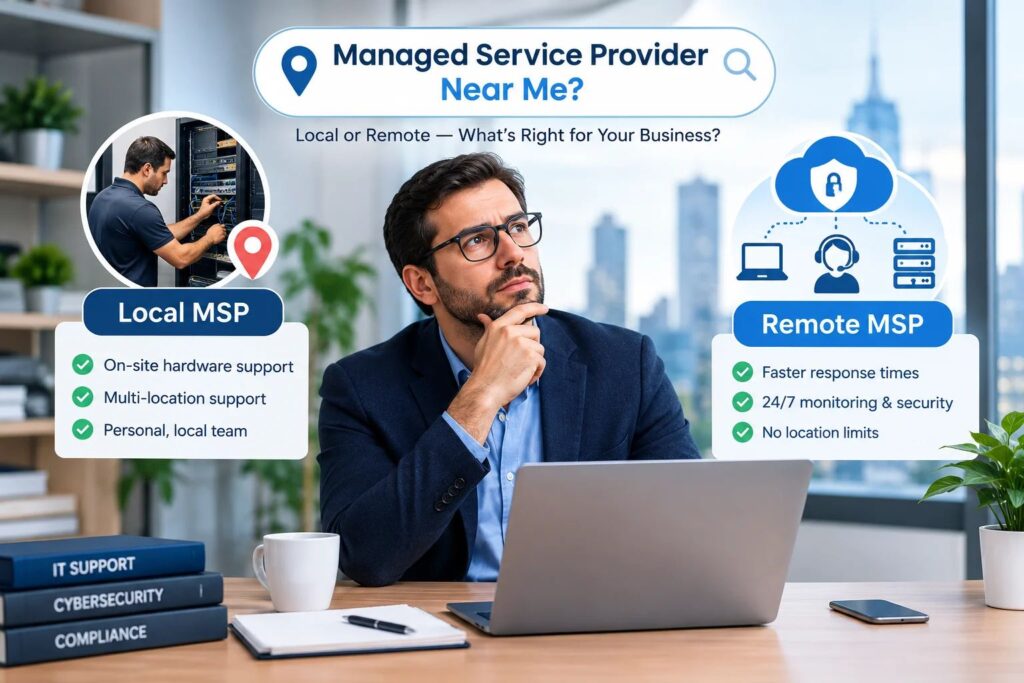
Short answer: For most CPA firms and small offices, location matters far less than people expect. Monitoring, patching, helpdesk, security and backups are delivered remotely, no matter where your provider sits. A managed service provider’s (MSP’s) tax-season response times, security controls, compliance documentation and on-site plan matter more than the distance to its office. Choose a local MSP mainly if you have physical hardware or several sites that need frequent hands-on work.
Quick Decision Guide
| Your situation | Local MSP needed? | What to prioritize instead |
|---|---|---|
| Cloud-based firm (Microsoft 365, hosted tax software, laptops) | Usually no | Security, response times, tax software knowledge |
| Small office with a few workstations and a printer | Rarely | Remote-first provider with a scheduled on-site option |
| Server room, on-premise hardware or several offices | Sometimes | A provider that can dispatch hands-on help quickly |
| Regulated data (client tax records, SSNs, bank details) | Not by itself | WISP, FTC Safeguards Rule alignment, audit-ready documentation |
| Recovering from a breach or ransomware | Not necessarily | Speed of response, incident experience, forensic and recovery skills |
The rest of this guide explains why, what to check before you sign, and how to read the “near me” results without being misled.
Why Everyone Searches “Managed Service Provider Near Me”
When an IT problem hits, a nearby company feels safer. People searching this phrase usually want three things:
- Speed. Someone who answers fast and can show up if needed.
- Accountability. A real team they can call, not an anonymous ticket queue.
- Trust. A business with a local reputation to protect.
Those needs are real. But distance is only a stand-in for them, and it is not a very reliable one. Google ranks local results using relevance, distance and prominence, so a “near me” list shows you who is closest and best optimized, not who is best at supporting a firm like yours. Many of the pages you see are city landing pages written to rank, not proof of an office down the street.
So instead of asking “Who is closest?”, ask “Who can deliver speed, accountability and trust for my kind of firm?”
What a Managed Service Provider Actually Does
A managed service provider takes ongoing responsibility for your technology for a recurring monthly fee, instead of fixing things only when they break. A typical agreement includes:
- 24/7 monitoring of servers, workstations and networks.
- Helpdesk support for your staff.
- Patch management so software and operating systems stay updated.
- Cybersecurity, such as endpoint protection, multi-factor authentication (MFA) and email filtering.
- Backup and disaster recovery, including test restores.
- Cloud and Microsoft 365 administration.
- Strategic planning and budgeting, sometimes called a virtual CIO (vCIO).
- Compliance support, which for CPA firms means a Written Information Security Plan (WISP) and related documentation.
This is different from “break/fix” support, where you call someone only after something fails and pay by the hour.
What Gets Done Remotely vs. What Needs Someone On-Site
Most of what an MSP does never needs a person in your office.
| Usually handled remotely | Usually needs hands-on help |
|---|---|
| Monitoring, alerts and patching | Installing or replacing servers and network gear |
| Password resets and account changes | Structured cabling and Wi-Fi hardware installs |
| Microsoft 365 and software support | Office moves and new-location setups |
| Endpoint security and malware response | Swapping failed hardware |
| Backups and restore tests | Printer, scanner and peripheral problems |
| WISP drafting and annual reviews | Physical security checks |
| Remote access and VPN troubleshooting | Initial workstation roll-outs |
If your day-to-day issues live on the left, a remote-first provider can often respond faster than a local one, because there is no travel time. If most of your issues live on the right, local presence has real value.
Where Local Still Matters
Being honest about this builds trust, so here is when a nearby provider is worth prioritizing:
- You run on-premise servers or a server room that need physical care.
- You have several offices and need regular site visits.
- You expect frequent hardware work, such as new staff, moves or equipment refreshes.
- You want in-person planning meetings as part of the relationship.
- Your internet or cabling is unreliable and needs physical troubleshooting.
Even then, ask a pointed question: “How many technicians do you actually have near me, and how fast can one arrive?” Some providers advertise a local office but subcontract on-site work to freelancers, so you rarely get the same technician twice.
7 Things That Matter More Than Distance
1. Industry specialization
A provider that understands tax and accounting software will solve problems faster. Ask whether they support the tools your firm uses, such as UltraTax, Drake, Lacerte and CCH Axcess, and how they handle updates and e-file seasons. If your tax workflow also runs on hosted accounting software, see our guides on QuickBooks in the cloud and Sage cloud hosting.
2. Tax-season service levels
A generic service agreement treats every month the same. Your firm does not. Ask for written response and resolution targets for January through April, and whether staffing and on-call coverage increase before filing deadlines.
3. Compliance built into the service
Tax and accounting professionals are considered financial institutions under the Gramm-Leach-Bliley Act and the FTC Safeguards Rule, regardless of firm size, and the rule requires a written information security plan. The IRS provides a sample plan in Publication 5708 and a security guide in Publication 4557. Two points matter when choosing an MSP:
- Your MSP is a service provider under the rule. You are expected to oversee the vendors that touch client data, so ask what documentation and evidence they provide.
- Your IT provider and your compliance documentation should work from the same facts. If one team runs your systems and another writes your plan, gaps appear.
Learn more on our WISP compliance page and in our free WISP template and checklist.
4. A real security stack
Ask what is included, not just that security is “included.” A solid baseline for a CPA firm covers endpoint detection and response (EDR), MFA on email and remote access, email security, encryption for client files, patching and staff phishing training. Recent scams such as ClickFix attacks show why training and endpoint controls matter as much as firewalls. See our security solutions.
5. Backups that are tested
A backup you have never restored is a hope, not a plan. Ask how often restores are tested, where copies are stored, and how quickly you could be working again after ransomware.
6. A clear plan for on-site needs
A good remote-first MSP is upfront about what happens when something physical breaks: who goes, how soon, and who pays. Ask whether on-site visits are included, billed hourly or handled by a partner.
7. Transparent pricing and references
You should know what is included, what is extra and how projects are billed before signing. Ask for references from firms of similar size and, ideally, from other accounting practices.
Local vs. Remote vs. Hybrid: Side by Side
| Local MSP | Remote-first MSP | Hybrid | |
|---|---|---|---|
| Everyday support speed | Good | Often faster (no travel) | Fast |
| Hands-on hardware help | Strong | Needs a dispatch plan | Planned and scheduled |
| 24/7 coverage | Varies | Often built in | Built in |
| Specialist skills | Limited to local talent | Broader pool | Broad plus hands-on |
| Cost predictability | Varies (hourly add-ons) | Usually flat monthly | Usually flat plus visit rules |
| Best for | Server rooms, multi-site offices | Cloud-based firms | Firms that want both |
For many small firms, a remote-first model with scheduled on-site visits for hardware work gives the best balance. That is how our remote managed IT services work: monitoring, patching, helpdesk and security response happen remotely, and on-site visits are scheduled for hardware work, network changes or anything that genuinely needs hands-on access.
How Much Does a Managed Service Provider Charge?
Prices vary by provider, region, user count and scope, so treat these as planning ranges rather than quotes:
- Per user, per month: Most 2026 pricing guides place managed IT between roughly $100 and $300 per user, with many small businesses paying about $110 to $200. One survey of MSPs and buyers reported an average near $145 per user per month for fully managed support.
- Compliance adds cost. Regulated environments commonly add roughly $30 to $90 per user per month for tooling, documentation and audit preparation. For CPA firms, that includes WISP work and security evidence.
- Minimums. Some MSPs set a minimum monthly commitment, often in the range of $1,500 to $3,000, regardless of user count.
- Pricing models. Per-user pricing is now the most common because people use several devices each. Per-device, tiered bundles and flat fees also exist.
- Extras to watch. Projects, after-hours work, on-site visits, hardware markups and overage charges are often billed separately.
A cheaper monthly number is not a better deal if tax-season support, security tools or compliance documentation are left out. Compare scope, not just price. For a 15-person firm, request a written quote that itemizes what is included and what costs extra.
10 Questions to Ask Any MSP, Local or Not
- Do you work with CPA and accounting firms, and can I speak with one of them?
- What are your response and resolution times, and do they change in tax season?
- What exactly is included in the monthly fee, and what is billed separately?
- Which security tools do you deploy, and do you enforce MFA on email and remote access?
- How often do you test backup restores, and how fast can we recover?
- How do you handle on-site needs, and is that included in the price?
- Do you provide WISP documentation and evidence for the FTC Safeguards Rule?
- Who owns our passwords, documentation and admin accounts if we leave?
- What is the contract length, and how do we exit?
- What happens in the first 30 days of onboarding?
Red Flags to Watch For
- No questions about your firm. A quote without an audit or discovery call is a guess.
- Vague security answers such as “we take care of it.”
- No tax-season plan.
- Long auto-renewing contracts with hard exit terms.
- Refusing to share documentation or admin access.
- Subcontracted on-site work with no consistent technician.
- Compliance sold as a separate project after you have signed.
- Pressure to decide fast or very low prices that exclude key tools.
What Kinds of Managed Service Providers Exist?
Searchers often ask who the managed service providers are. Rather than a list of names, it helps to know the types:
- General small-business MSPs support many industries with standard packages.
- Industry-specialized MSPs focus on one field, such as accounting or healthcare, and build tools and compliance into the service.
- Managed security providers (MSSPs) focus mainly on security monitoring and response.
- Break/fix and local IT shops fix problems when they happen, usually billed by the hour.
- Co-managed providers support an internal IT person or team.
For a CPA firm, an industry-specialized MSP that also handles compliance is often the best fit because it understands your calendar, software and legal obligations.
How to Use “Near Me” Results Wisely
If you do start with a local search, use it as a shortlist, not a verdict:
- Check whether the company has a real office and named technicians.
- Read recent reviews for response time and communication, not just star ratings.
- Compare two or three providers on the same checklist above.
- Ask for a written scope and quote from each.
- Add one or two remote-first specialists to your shortlist, since geography should not rule them out.
How TechFiscal Works With CPA Firms
TechFiscal provides managed IT, cybersecurity and compliance documentation for CPA firms and growing businesses. Support is delivered remotely with 24/7 monitoring, with on-site visits scheduled when hands-on work is required. Engagements start with a free IT and compliance audit so you see gaps in backups, MFA, patching and your WISP before committing to a plan. Learn more about IT for CPA firms, small business IT, cloud migration, and how we work.
Frequently Asked Questions
Do I need a managed service provider near me? Not always. Most managed IT work, including monitoring, patching, helpdesk and security, is done remotely. A nearby provider helps mainly when you have on-premise hardware, multiple offices or frequent hands-on needs.
What exactly is a managed service provider? An MSP is an outside company that manages your IT on an ongoing basis for a monthly fee. It monitors systems, supports your staff, applies updates, protects against threats and helps with planning and compliance.
How much does a managed service provider charge? Many 2026 guides place managed IT between about $100 and $300 per user per month, with many small businesses paying roughly $110 to $200. Compliance, after-hours coverage, on-site visits and projects can add to that, so ask for an itemized quote.
Is remote IT support as good as local support? For everyday issues such as password resets, software problems, patching and security response, remote support is usually as good and often faster. For physical hardware work, you need a plan for on-site help.
What should a CPA firm look for in an MSP? Look for experience with tax and accounting software, written tax-season service levels, security controls such as MFA and EDR, tested backups and documentation that supports your WISP and the FTC Safeguards Rule.
Does my firm need a WISP if it uses cloud software? Yes. Tax and accounting professionals are considered financial institutions under the Safeguards Rule and must maintain a written information security plan, even when client data lives in cloud applications.
What if I need someone on-site? Ask your provider how on-site visits work before you sign: who attends, how quickly, and whether the cost is included or billed separately.
How do I switch managed service providers? Start with an audit of your current setup, confirm you own your admin credentials and documentation, review contract exit terms and plan the move outside peak filing season.
Not Sure Whether You Need Local or Remote Support?
Tell us about your firm and we will give you a straight answer, even if the answer is that a local provider is a better fit. Request a free IT and compliance audit, explore our services or talk to our team.